


Kwai - Video & Drama
4.08.87K Reviews
App Specs
- Version
- 13.7.30.546101
- Updated On
- License
- Free
- Downloads
- 500,000,000+
- Developer
- Joyo Technology Pte Ltd
- Categories
- Video Players & Editors
- Platform
- Android, iOS
Screenshots
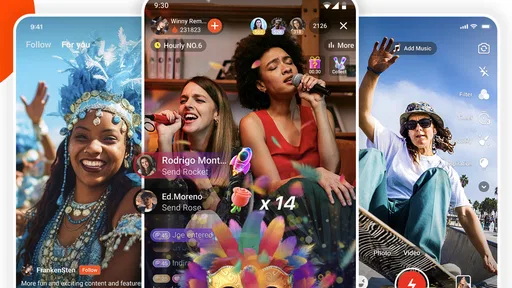




 Analysis by AppCompare
My first impression of Kwai - Cool Video & Social Fun is that it asks you to move between watching and making videos rather than treating those as separate activities. That can be appealing if you like a quick feed of clips but also want a simple way to try your own edits. It is a free video and social app from Joyo Technology Pte Ltd, with a Teen content rating, so I’d approach it as a public-facing social space rather than just a private editing tool.
What to expect when you open it
Kwai brings short videos, creator profiles, social interaction, live streams and shopping-related trends into one place. The mix makes the app feel busier than a basic video editor: you can watch for a while, follow someone whose style you enjoy, or switch to creating. That variety is its main draw, but it also means the experience is not as focused as an app built only for editing or only for watching.
The scale is substantial: Kwai has more than 500 million installs and an average rating of 4.1 from around 11 million ratings. Those figures suggest a broad audience, but they cannot tell you whether the feed will suit your taste. I’d give it a little time to show what kinds of clips interest you, while remembering that a recommendation feed reflects what you watch and interact with.
Guides and Analysis on Kwai - Video & Drama
A calmer first setup
On your first visit, I’d resist the urge to follow lots of accounts or react to every clip just to get through the feed. Spend a few minutes noticing which subjects and formats you actually enjoy, then follow only creators you would want to see again. This small bit of selectiveness can make the feed feel more personal without turning setup into a project.
If you plan to make a video, decide on a simple idea before browsing effects: a short reaction, a quick demonstration, or a moment from an ordinary day. Starting with a clear purpose helps you choose an edit that supports the clip rather than piling on effects because they are available. You can explore the tools after you know what you want the video to say.
Kwai runs on Android starting with version 5.0, and the current version is 13.1.10.543603. The app is free to install, with optional in-app purchases listed from $0.99 to $114.99 per item. I’d treat those purchases as something to review carefully if they appear during use; you do not need to assume that spending is part of the basic reason to try the app.
Getting from browsing to making
Alright, let’s break it down. Kwai is a popular app that lets you create, share, and watch short videos. It’s like a mix of entertainment, creativity, and social interaction all bundled into one neat package. If you’ve ever wanted to showcase your talents, engage with a global community, or simply procrastinate by watching hilarious clips, Kwai has got you covered.
Worth Reading Before You Choose

ESPN’s Live Game View Makes Following Close Games Easier

QuizzLand Review: A Good Fit for Short Trivia Breaks, Not Every Player

Basketball Stars: Multiplayer Is Fast, but Can It Recover When Matches Go Wrong?

WEBTOON Turns Phone Updates Into a Better Reading Routine

Link to Windows Runs on Shared Habits, Not Social Feeds

How Alibaba.com Dominates the B2B Marketplace
Features That Stand Out
Now, let's get into the nitty-gritty. One of the first things I noticed about Kwai is its user-friendly interface. It's super intuitive, which means you don’t need to be a tech wizard to start creating. Just a few taps, and you’re on your way to internet stardom!
But what really sets Kwai apart is its editing tools. The app offers a plethora of filters, effects, and music tracks to jazz up your videos. Whether you’re aiming for something artsy or just plain fun, the options are endless. I spent way too much time playing around with these features, and trust me, it’s addictive.
For a first successful attempt, I’d keep the workflow deliberately small: choose one clear moment, try a single effect or music choice, preview the result, and only then decide whether it needs more. The useful trade-off is control versus speed. A handful of choices can make a clip feel more finished, while too many can distract from the moment you wanted to share. If your goal is a polished edit with detailed control over a longer project, a dedicated editor is likely a better fit.
"The creativity that Kwai unleashes in you is just phenomenal."
Community Vibes & Social Interaction
One of the coolest aspects of Kwai is its community. The app doesn’t just focus on content creation; it’s all about building connections. You can follow other creators, engage with their content, and even participate in challenges. I found the community to be super supportive, which makes the whole experience even more enjoyable.
And let’s not forget the social features. You can chat with friends, send private messages, and share your favorite videos. It’s like having a mini social network dedicated to video content. Whether you’re in it for the laughs or the likes, Kwai provides a platform to express yourself and connect with others.
Making the feed work for you
A practical way to explore is to treat the feed as something you can shape, not a channel you have to watch passively. When a clip genuinely appeals to you, follow its creator or engage with it; when a run of videos is not your thing, move on instead of watching out of habit. The distinction matters because lingering on something can give the app a signal that you want more of it, even if you were only curious.
For a realistic everyday use, imagine you have a few minutes while waiting for a friend. You can watch a couple of clips, save a creator’s style as inspiration, then later record a short video of a recipe step or a small hobby project. That is a more manageable first creation than trying to produce a trend-ready performance on the spot. It also gives you a concrete reason to return beyond endless scrolling.
Live streams and trend-focused shopping add another layer to the social feed. I’d approach those as optional destinations rather than obligations: if you arrive for videos, you can stay with that, and if a live session or trend catches your eye, explore it on its own terms. Keeping those interests separate can help the app feel useful instead of overwhelming.
Why You Might Love It
If you’re someone who loves being entertained, Kwai will keep you hooked. The endless stream of content is perfect for those moments when you just want to unwind and laugh. Plus, the app’s algorithm curates videos based on your interests, so you’re always discovering new and exciting content.
For creators, Kwai offers a chance to showcase your talents to a global audience. Whether you’re a dancer, comedian, or just someone with a knack for storytelling, there’s room for everyone. And the best part? You can go viral overnight. Who doesn’t love a bit of fame, right?
Where it fits beside other video apps
Compared with a conventional video player, Kwai is built around a social feed and participation, so it makes more sense when you want to discover people and respond to short clips than when you simply want to play a file you already have. Compared with a standalone editing app, its appeal is the close connection between creating and sharing, while a dedicated editor may offer a more focused environment for careful, multi-step work. If you mainly want long-form viewing, a service centered on longer videos may suit you better.
The audience side is not automatically a benefit for every creator. A large platform can offer reach, but it does not promise attention or a particular response. I’d post because I enjoy making the clip, not because I expect it to take off. If you prefer to edit privately, keep a portfolio without social interaction, or avoid public feedback, Kwai may not be the right starting point.
Small choices that make sharing easier
One useful habit is to watch your clip once with the sound on and once without relying on it. That makes it easier to notice whether the visuals communicate the point clearly and whether the music is helping or competing with it. Another is to check the finished video before sharing rather than assuming the first preview is the version you want. These are simple checks, but they prevent a casual experiment from becoming a post you immediately wish you had edited differently.
It is also worth separating the roles of following and messaging. Following someone is a way to bring more of their public videos into your feed; a private message is a more direct social step. I’d start with public interaction and use messages only when there is a clear reason to contact someone. That keeps your first experience low-pressure and helps you learn how the community feels before getting more involved.
Final Thoughts
So, should you download Kwai? If you’re into video creation and social networking, I’d say go for it. It’s fun, engaging, and offers a unique platform to express yourself. Plus, it’s free, so there’s no harm in trying it out.
In a nutshell, Kwai is more than just a video app; it’s a community waiting to welcome you. Whether you’re a viewer or a creator, there’s something for everyone. So, why not give it a shot and see where your creativity takes you?
My recommendation comes with one condition: decide what you want from it. If you want a quick stream of short clips, a place to discover creators, and an easy route from watching to trying a basic edit, it has a clear purpose. If you want a quiet, tightly controlled editor or a feed with no social distractions, another kind of app will be a better match. For a first visit, I’d browse selectively, make one uncomplicated clip if the tools appeal to you, and judge the experience by whether you want to come back—not by whether a post gets attention.
Pros
- User-friendly interface with intuitive navigation.
- Extensive library of trending videos and music.
- Offers creative editing tools for content creation.
- Regular updates with new features and improvements.
- Strong community engagement through challenges.
Cons
- Contains ads that can interrupt user experience.
- Limited privacy settings for personal content.
- High data consumption for video uploads and streams.
- Some features require in-app purchases.
- Occasional app crashes during heavy use.
FAQs for Kwai - Video & Drama
What is Kwai and what features does it offer?
Kwai is a social media app that lets users create, edit, and share short videos. It features a wide array of editing tools, filters, and effects to enhance videos. Users can explore trending content, follow creators, and participate in challenges. The app also includes options for live streaming and direct messaging.
Is Kwai free to use?
Yes, Kwai is free to download and use on both Android and iOS platforms. While most features are accessible at no cost, some in-app purchases and premium features may be available, such as special effects or additional editing tools, which can enhance the user experience further.
How does Kwai ensure user privacy and safety?
Kwai prioritizes user privacy by providing settings that allow users to control who can view and interact with their content. Users can report inappropriate behavior and content. The app also employs moderation to ensure compliance with community guidelines, helping to create a safer environment for all users.
What are the system requirements for installing Kwai?
To install Kwai, users need a device running iOS 10.0 or later for Apple devices, and Android 5.0 or higher for Android devices. The app requires a stable internet connection for optimal performance and may require a significant amount of storage for video content creation and download.
Can I monetize my content on Kwai?
Yes, Kwai provides opportunities for content creators to monetize their videos. Users can earn through virtual gifts during live streams and by participating in sponsored challenges. To maximize earnings, creators are encouraged to grow their follower base and engage actively with the community.


